Free online tool
Free Electrical Takeoff — AI Counts Your Plans in Minutes
Upload an electrical plan set as PDF. The AI reads your fixture and panel schedules first, then counts every plan page with that vocabulary — fixtures, receptacles, switches, panels, feeders — each line tied to the sheet it came from.
- ✓ Upload a PDF plan set — schedules, plans, or both
- ✓ AI reads schedules first, then counts the plans with that vocabulary
- ✓ Every learned mark is verified against the page before it can price
- ✓ First takeoff free — no card required
Free account · your first electrical takeoff is on us
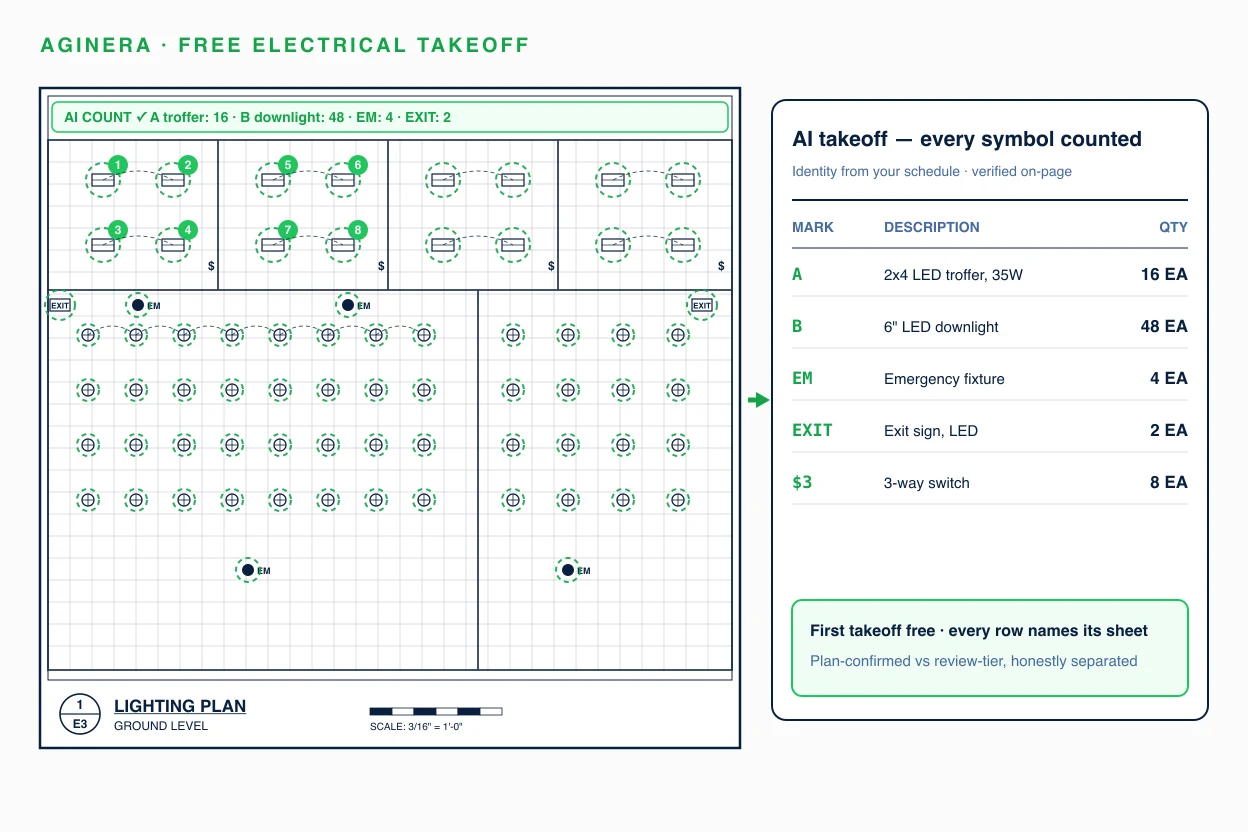
A real electrical takeoff — already done
State Park Electrical · Montauk State Park, MO — public bid set X2204-04. Click any row to see where it was read on the sheet.
Try it now — one electrical sheet, no signup
Drop a electrical drawing and the AI reads a sheet instantly. The full plan set, review and Excel export unlock with a free account.
Extract a electrical bill of materials from your PDF
Drop a drawing and the AI reads one sheet instantly — no signup. Multi-sheet reading, review and Excel export unlock with the $5 package or a free account.
Choose a PDFHow the free electrical takeoff works
Upload your PDF plan set
Lighting plans, power plans, schedules, one-lines — together or separately. Multi-hundred-page sets are fine.
AI reads schedules, then plans
The fixture and panel schedules define identity; project memory carries those marks to every plan page it counts.
Review a provenance-backed takeoff
Plan-confirmed quantities separated from review items, with every count traceable to its sheet. Export to Excel or your estimate.
What the AI extracts from your electrical drawings
Line items arrive with identity, quantity, unit, sheet provenance, and a confidence tier — plan-confirmed quantities are separated from items that need review, so you always know which numbers to trust.
The only takeoff AI that remembers your projects
Most AI takeoff tools read every drawing set from scratch. Aginera harvests schedule-proven marks into project memory and verifies every remembered fact against the page before it can touch pricing — so your tenth takeoff beats your first. In paired production tests, schedule-mark coverage improved from 21% to 39% with zero fabricated items.
Read the engineering deep-dive on extraction memory →Free electrical takeoff — common questions
Is the electrical takeoff really free?
Yes — create a free account and your first electrical takeoff is free, no card required. You get the full output: typed fixture counts, device counts, panel scope, and sheet-by-sheet provenance, exportable to Excel. Ongoing use is covered by free-tier limits, with paid plans for production volume.
What file types can I upload for an electrical takeoff?
PDF plan sets are the primary input — vector or scanned. Aginera also extracts from CAD files (DWG/DXF) on paid tiers. A typical upload is the electrical set: lighting plans, power plans, schedules, and one-line diagrams together.
How does the AI know what fixture type "A1" means on my plans?
It reads your lighting fixture schedule first. The schedule defines every mark — A1, B3, WS1 — with its description and voltage, and Aginera carries that identity to every plan page it counts, even when the schedule and the plan are on different sheets. Every schedule-derived identity is verified against the page it is counted on before it can be priced.
How accurate is an AI electrical takeoff compared to counting by hand?
On clean vector plan sets the AI separates plan-confirmed quantities (counted symbols reconciled against schedules) from review-tier items, so you spot-check instead of recounting. Scanned or low-resolution sets extract with reduced confidence and route more items to review. Treat the free takeoff the way you would a junior estimator's first pass: fast, typed, traceable — and reviewable in a fraction of the time counting takes.
Does it count receptacles and switches separately from fixtures?
Yes. Devices are kept in their own categories — duplex receptacles, GFCI, special-purpose, switches by type — and never lumped into a generic count. Panel-schedule circuit counts are reconciled against the printed schedules where the set includes them.
Can I use the takeoff for my estimate and bid?
Yes. Line items carry identity, quantity, unit, and sheet provenance, and export cleanly to Excel or into Aginera's estimating workflow, where assemblies and pricing build on the takeoff quantities. Review-tier items are labelled so you know exactly what to verify before bid day.
Run your first electrical takeoff free
Evaluating platforms for your team instead? See the full AI Electrical Takeoff Software overview →