Free online tool
Free HVAC Takeoff — Equipment, Duct & Air Devices From Your PDF
Upload a mechanical plan set as PDF. The AI reads your equipment schedules first — RTU, FCU, EF, AHU tags with capacities — then counts every plan page with that vocabulary, from rooftop units down to diffusers and duct runs.
- ✓ Upload a PDF plan set — schedules, plans, or both
- ✓ AI reads schedules first, then counts the plans with that vocabulary
- ✓ Every learned mark is verified against the page before it can price
- ✓ First takeoff free — no card required
Free account · your first hvac takeoff is on us
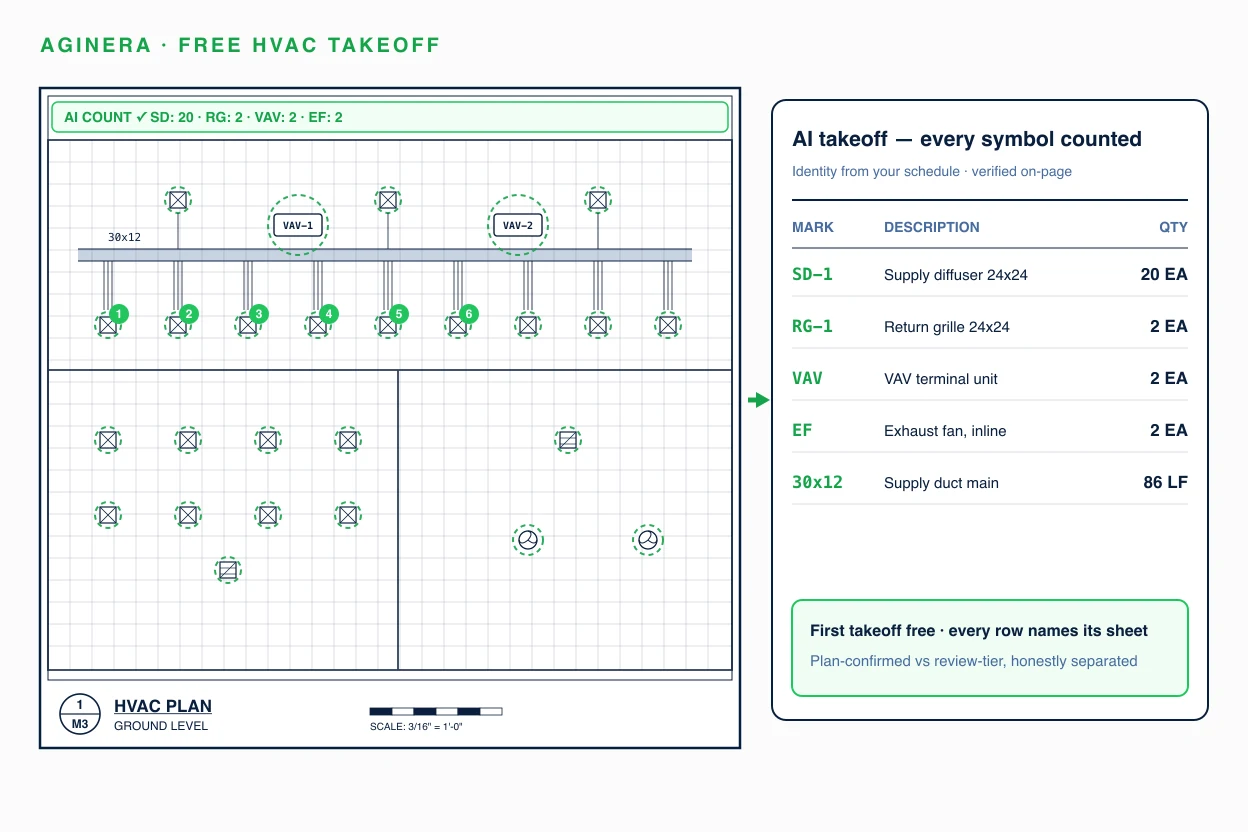
A real hvac takeoff — already done
Hospital Chiller Plant Upgrade · Center for Behavioral Medicine, Kansas City MO — public bid set M2430-01. Click any row to see where it was read on the sheet.
Try it now — one hvac sheet, no signup
Drop a hvac drawing and the AI reads a sheet instantly. The full plan set, review and Excel export unlock with a free account.
Extract a hvac bill of materials from your PDF
Drop a drawing and the AI reads one sheet instantly — no signup. Multi-sheet reading, review and Excel export unlock with the $5 package or a free account.
Choose a PDFHow the free hvac takeoff works
Upload your PDF plan set
Mechanical plans, equipment schedules, ventilation schedules, details — combined sets with other trades are handled.
AI reads schedules, then plans
The equipment schedule defines every tag; project memory carries those tags to each plan page — even across a 187-page combined set.
Review a provenance-backed takeoff
Equipment, duct and devices with plan-confirmed quantities separated from review items. Export to Excel or your estimate.
What the AI extracts from your hvac drawings
Line items arrive with identity, quantity, unit, sheet provenance, and a confidence tier — plan-confirmed quantities are separated from items that need review, so you always know which numbers to trust.
The only takeoff AI that remembers your projects
Most AI takeoff tools read every drawing set from scratch. Aginera harvests schedule-proven marks into project memory and verifies every remembered fact against the page before it can touch pricing — so your tenth takeoff beats your first. In paired production tests, schedule-mark coverage improved from 21% to 39% with zero fabricated items.
Read the engineering deep-dive on extraction memory →Free hvac takeoff — common questions
Is the HVAC takeoff really free?
Yes — create a free account and your first HVAC takeoff is free, no card required. You get typed equipment counts with schedule tags, duct and air-device quantities, and sheet provenance on every line, exportable to Excel. Free-tier limits cover ongoing light use; paid plans cover production volume.
Can it read my mechanical equipment schedule?
Yes — the schedule is where extraction starts. Aginera reads the equipment schedule (tags, capacities, models) and the ventilation schedule, then uses those exact tags when counting plan pages. A fan coil labelled FCU-8-01 on the plan is matched to its schedule row, and that identity is verified against the printed page before it can be priced.
Does it handle combined sets where mechanical is mixed with other trades?
Yes. Per-page routing classifies each sheet by trade before extraction, so a combined architectural + MEP set routes mechanical sheets to mechanical extraction. On one production 187-page combined set, tag-level extraction recovered 178 mechanical equipment marks that a single-pass read had missed.
Can it take off ductwork lengths, or just count equipment?
Both. Duct runs are extracted with their printed sizes (e.g. 24x10 supply) and routed lengths where the drawing states them, alongside diffusers, grilles, dampers and equipment counts. Linear quantities from drawings without stated dimensions are flagged for review rather than guessed.
How is this different from doing my mechanical takeoff in a general PDF tool?
A measuring tool makes you find, identify and count everything yourself. Aginera's AI does the identification — schedule tags, capacities, duct sizes — and hands you a typed, sheet-referenced quantity list to review. The difference compounds: project memory means the second document in your project is read with everything the schedules already established.
What about plumbing and electrical on the same project?
The same upload covers them. Aginera extracts electrical, plumbing, fire protection and HVAC from one plan set, each trade with its own schedules-first pass — see the free electrical takeoff and free plumbing takeoff tools, or run a full multi-trade takeoff from one upload.
Run your first hvac takeoff free
Evaluating platforms for your team instead? See the full HVAC Duct Takeoff overview →