Free online tool
Free Plumbing Takeoff — Fixtures & Piping From Your PDF
Upload a plumbing plan set as PDF. The AI reads your fixture schedule first — WC, LAV, S-1, WH-1 with specs — then counts every plan page with that vocabulary, from fixtures and heaters to drains, cleanouts and piping runs.
- ✓ Upload a PDF plan set — schedules, plans, or both
- ✓ AI reads schedules first, then counts the plans with that vocabulary
- ✓ Every learned mark is verified against the page before it can price
- ✓ First takeoff free — no card required
Free account · your first plumbing takeoff is on us
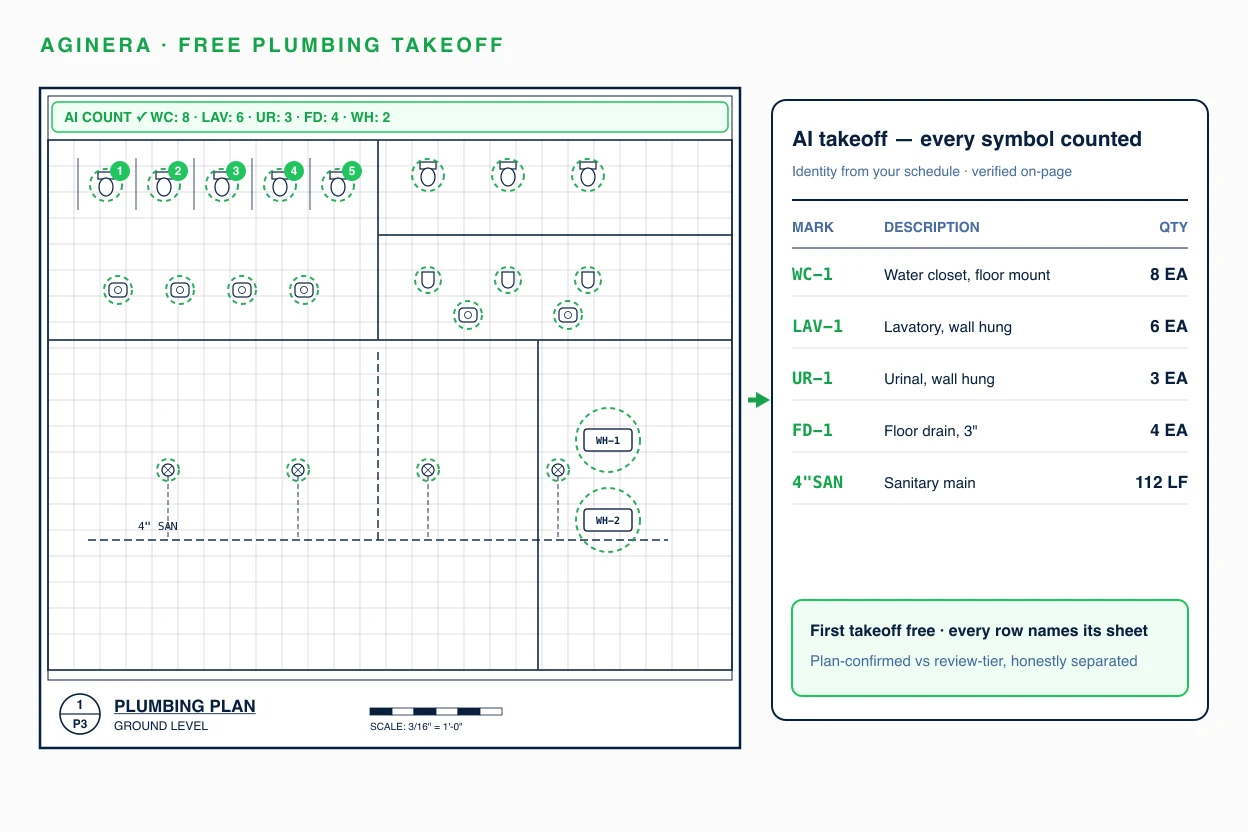
A real plumbing takeoff — already done
Shower House Plumbing · Montauk State Park, MO — public bid set X2530-01. Click any row to see where it was read on the sheet.
Try it now — one plumbing sheet, no signup
Drop a plumbing drawing and the AI reads a sheet instantly. The full plan set, review and Excel export unlock with a free account.
Extract a plumbing bill of materials from your PDF
Drop a drawing and the AI reads one sheet instantly — no signup. Multi-sheet reading, review and Excel export unlock with the $5 package or a free account.
Choose a PDFHow the free plumbing takeoff works
Upload your PDF plan set
Plumbing plans, fixture schedules, risers and details — sanitary and water sheets together or split.
AI reads schedules, then plans
The fixture schedule defines every mark; project memory carries those marks to each plan page it counts.
Review a provenance-backed takeoff
Fixtures, equipment and piping with plan-confirmed quantities separated from review items. Export to Excel or your estimate.
What the AI extracts from your plumbing drawings
Line items arrive with identity, quantity, unit, sheet provenance, and a confidence tier — plan-confirmed quantities are separated from items that need review, so you always know which numbers to trust.
The only takeoff AI that remembers your projects
Most AI takeoff tools read every drawing set from scratch. Aginera harvests schedule-proven marks into project memory and verifies every remembered fact against the page before it can touch pricing — so your tenth takeoff beats your first. In paired production tests, schedule-mark coverage improved from 21% to 39% with zero fabricated items.
Read the engineering deep-dive on extraction memory →Free plumbing takeoff — common questions
Is the plumbing takeoff really free?
Yes — create a free account and your first plumbing takeoff is free, no card required. You get fixtures by schedule mark, equipment, drains and piping with sheet provenance on every line, exportable to Excel. Free-tier limits cover ongoing light use; paid plans cover production volume.
How does it identify fixture types on my plans?
It reads your plumbing fixture schedule first. The schedule defines each mark — WC-1, LAV-2, S-1, WH-1 — with its specification, and Aginera carries that identity to every plan page it counts. Marks recovered from memory are verified against the printed page before they can be priced, so a schedule mark is never invented onto a sheet that does not show it.
Does it take off piping, or only count fixtures?
Both. Sanitary, waste, vent and domestic water runs are extracted with their printed sizes, alongside drains, cleanouts, valves and specialties. Linear quantities that the drawing does not dimension are flagged for review rather than guessed.
Can it handle scanned plumbing drawings?
Yes — scanned sets run through vision extraction. Identification confidence is lower than on vector PDFs, so more items route to the review tier; the takeoff tells you which quantities are plan-confirmed and which need a look. Clean vector sets with a fixture schedule give the best results.
We bid mechanical and plumbing together — one upload or two?
One upload. Aginera routes each sheet by trade and extracts plumbing, HVAC, and electrical from the same set — each trade gets its own schedules-first pass. See the free HVAC takeoff and free electrical takeoff tools for the sibling trades.
What do I get compared to counting fixtures by hand?
A typed quantity list in minutes instead of hours: every fixture carries its schedule mark and spec, every count names its sheet, and review-tier items are labelled so you verify the uncertain rows instead of recounting everything. Project memory means the next document in the same project starts from what the schedules already established.
Run your first plumbing takeoff free
Evaluating platforms for your team instead? See the full AI Plumbing Takeoff Software overview →