PDF to BOM Converter — From Drawings to Bill of Materials
Upload PDF construction drawings and get a structured bill of materials automatically. AI extracts every component, counts quantities, and organizes the output for estimating or procurement.
A PDF to BOM converter turns a drawing PDF into a bill of materials — a list of every part with its description, size or spec, quantity, unit and the sheet it came from. Aginera does it two ways: it transcribes the bill-of-material tables printed on spool, shop and vendor drawings, and it counts the components on plan sets that have no table. Both export to Excel, and every line links back to the drawing.
Real output 1 — a spool package with printed BOM tables
Six scanned spool sheets, each with its own bill of material box. Aginera read the tables directly — no extraction run, about 35 seconds for the set. This is the exact table it produced.
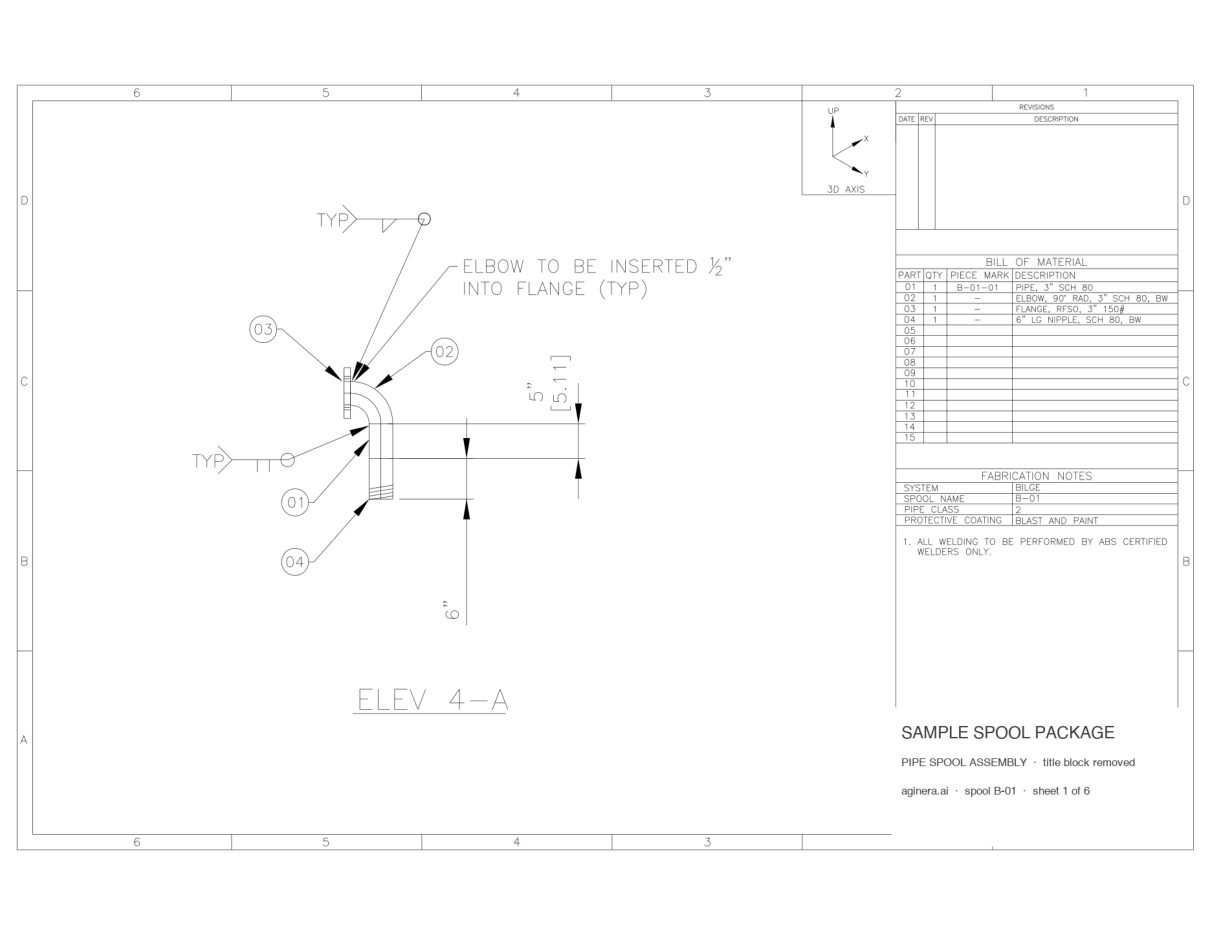
Sample sheet 1 of 6. Title block, company names and drawing numbers removed. Download the sample PDF →
Pipe spool package — 6 spool sheets, scanned
Six bilge-system spool assemblies (3" SCH 80), one per sheet, each with its own BILL OF MATERIAL and a fabrication-notes box naming the spool, system, pipe class and coating.
- Pages
- 6
- Read time
- ~35s
Bill of material as read by Aginera — 15 lines
Every line below was transcribed from the printed table on the sheet; nothing was typed in.
| Pos | Description | Size / rating / material | Qty | Unit |
|---|---|---|---|---|
| Sheet 1Spool B-01System BILGEClass 2Coating BLAST AND PAINT | ||||
| 01 | PIPE, 3" SCH 80B-01-01 | 1 | ||
| 02 | ELBOW, 90° RAD, 3" SCH 80, BW | 1 | ||
| 03 | FLANGE, RFSO, 3" 150# | 1 | ||
| 04 | 6" LG NIPPLE, SCH 80, BW | 1 | ||
| Sheet 2Spool B-02System BILGEClass 2Coating BLAST AND PAINT | ||||
| 01 | PIPE, 3" SCH 80B-02-01 | 1 | ||
| 02 | FLANGE, RFSO, 3" 150# | 1 | ||
| Sheet 3Spool B-03System BILGEClass 2Coating BLAST AND PAINT | ||||
| 01 | ELBOW, 90° RAD, 3" SCH 80, BW | 1 | ||
| 02 | FLANGE, RFSO, 3" 150# | 1 | ||
| 03 | 7 1/2" LG NIPPLE, SCH 80, BW | 1 | ||
| Sheet 4Spool B-04System BILGEClass 2Coating BLAST AND PAINT | ||||
| 01 | PIPE, 3" SCH 80B-04-01 | 1 | ||
| 02 | FLANGE, RFSO, 3" 150# | 1 | ||
| Sheet 5Spool B-05System BILGEClass 2Coating BLAST AND PAINT | ||||
| 01 | PIPE, 3" SCH 80B-05-01 | 1 | ||
| 02 | ELBOW, 90° RAD, 3" SCH 80, BW | 2 | ||
| Sheet 6Spool B-06System BILGEClass 2Coating BLAST AND PAINT | ||||
| 01 | PIPE, 3" SCH 80B-06-01 | 1 | ||
| 02 | ELBOW, 90° RAD, 3" SCH 80, BW | 2 | ||
Spool register — read from the same sheets
Title block, fabrication notes and design data, one row per spool sheet. Exported as a Spools tab in the Excel workbook.
| Sheet | Spool | System | Pipe class | Coating | Design code | Design / test pressure | NDE | BOM lines |
|---|---|---|---|---|---|---|---|---|
| 1 | B-01 | BILGE | 2 | BLAST AND PAINT | 4 | |||
| 2 | B-02 | BILGE | 2 | BLAST AND PAINT | 2 | |||
| 3 | B-03 | BILGE | 2 | BLAST AND PAINT | 3 | |||
| 4 | B-04 | BILGE | 2 | BLAST AND PAINT | 2 | |||
| 5 | B-05 | BILGE | 2 | BLAST AND PAINT | 2 | |||
| 6 | B-06 | BILGE | 2 | BLAST AND PAINT | 2 |
More on spool and isometric sheets, including the spool register: Pipe spool drawings to BOM →
Real output 2 — a plan set with no BOM printed on it
Three structural framing plans. There is no material list on these sheets, so Aginera counted the member callouts and measured their lengths, then rendered the takeoff as a BOM by shape.
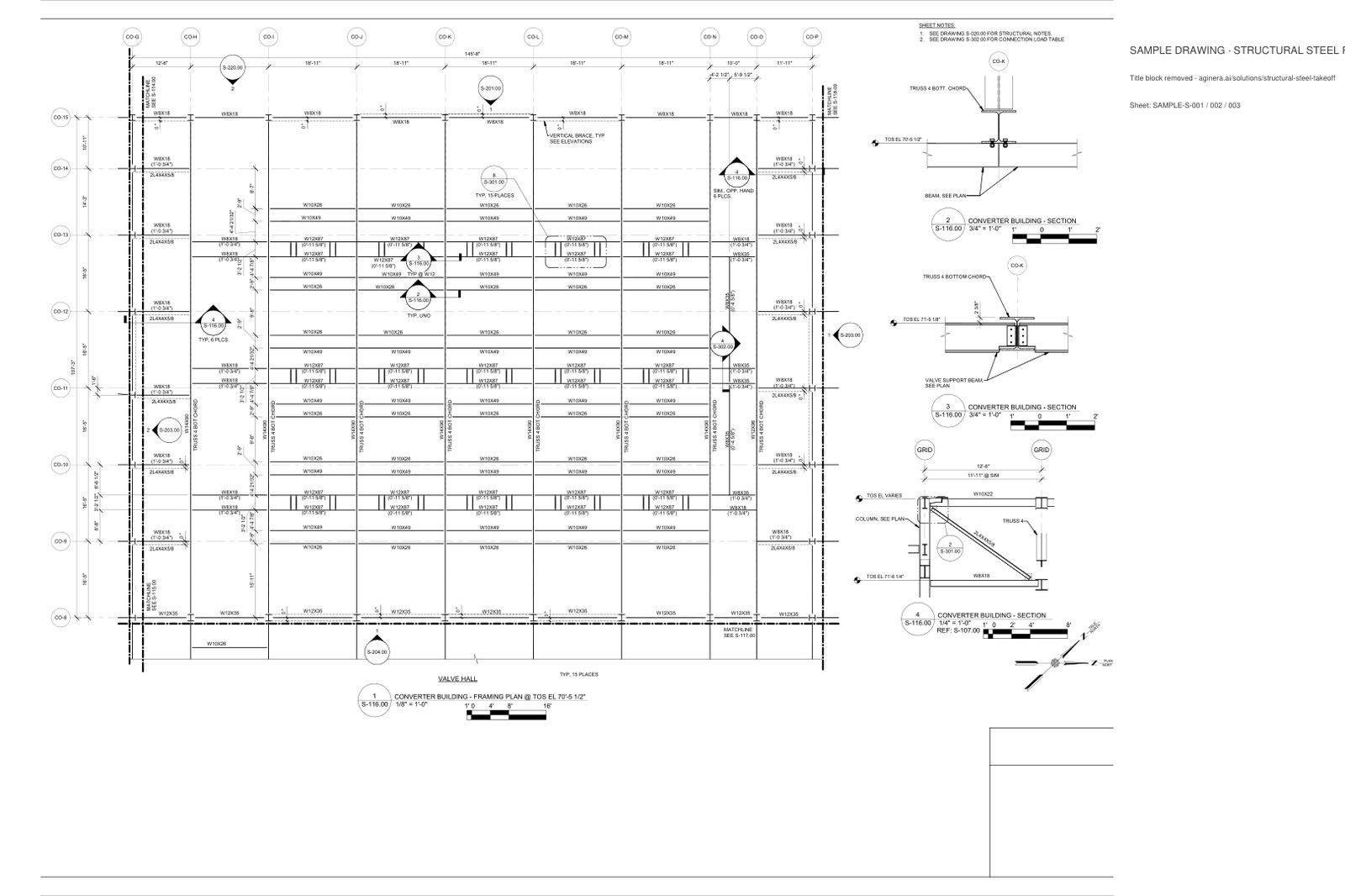
Sample sheet 1 of 3. Title block, company names and drawing numbers removed. Download the sample PDF →
Structural steel framing — 3 plan sheets, vector PDF
Three truss-chord framing plans from a converter-building bid set: W-shapes, HSS and double angles called out on the plan with grid bubbles. Every callout becomes a counted member; lengths come from the grid spacing and printed dimensions.
- Pages
- 3
Steel BOM by shape — 524 members, 9,006 LF, 158 tons
One row per AISC shape across the three framing sheets. Counts are member callouts on the plan; lengths come from grid spacing and printed dimensions; weight is length × the AISC unit weight.
| Shape | Family | EA | Length (LF) | lb/ft | Weight (lb) | Sheets |
|---|---|---|---|---|---|---|
| W12X87 | W-shape | 60 | 1,135 | 87 | 98,742 | 1, 2 |
| HSS6X6X1/4 | HSS | 186 | 3,291 | 19.02 | 62,587 | 3 |
| W10X49 | W-shape | 60 | 1,135 | 49 | 55,614 | 1, 2 |
| W10X26 | W-shape | 62 | 1,168 | 26 | 30,376 | 1, 2 |
| W14X90 | W-shape | 15 | 246 | 90 | 22,167 | 1, 2 |
| W8X18 | W-shape | 59 | 839 | 18 | 15,097 | 1, 2 |
| W12X35 | W-shape | 18 | 291 | 35 | 10,197 | 1, 2 |
| 2L4X4X5/8 | Double angle | 25 | 305 | 31.34 | 9,565 | 1, 2 |
| L6X4X3/8 | Angle | 25 | 433 | 12.3 | 5,328 | 3 |
| W8X35 | W-shape | 12 | 146 | 35 | 5,100 | 1, 2 |
| W12X96 | W-shape | 1 | 16 | 96 | 1,576 | 1 |
| W10X22 | W-shape | 1 | 0 | 22 | 0 | 1 |
| Total | 524 | 9,006 | 316,349 | |||
How the steel BOM is built: Structural steel takeoff →
Building BOMs from PDFs is slow and error-prone
You receive plan sets as PDFs. Your estimators open them, zoom in, and start manually counting symbols — page by page, sheet by sheet. Components get entered into Excel, quantities get tallied, and after hours of work you have a BOM that you hope is accurate.
Aginera converts your PDF drawings into structured bills of materials automatically. Upload the PDF, let the AI do the counting, and get a BOM you can review, price, and send — in minutes instead of hours.
How It Works
Upload PDF → Get BOM. Printed tables are transcribed; everything else is counted.
Upload the PDF
One multi-sheet PDF or several files. Vector or scanned — both are read.
Read the BOM
If the sheets carry a printed bill of material, click BOM and read the tables. If not, run Extract for the trade and the takeoff becomes the BOM.
Check on the sheet
Every line links to its sheet: click it and the viewer highlights the printed row or the counted symbol.
Export
Excel or CSV, with sheet references on every line — ready for pricing, procurement or your ERP.
Step-by-step with screenshots: PDF to bill of materials — documentation
What the BOM Contains
Structured, organized, and ready for pricing.
Component Identification
Every symbol and device identified by type — panels, conduit, ductwork, fixtures, equipment, devices, and more.
Accurate Quantities
Counts for discrete items. Linear footage for conduit, ductwork, and piping. Area measurements where applicable.
Specifications
Size, type, rating, and material data extracted from annotations, schedules, and notes on the drawings.
Drawing References
Every BOM line traces back to the sheet and location where it was found — for easy verification.
Confidence Scores
Each item includes a confidence rating so you know which items to verify first during review.
Duplicate Detection
Items shown on multiple sheets (like equipment on a plan and a detail) are flagged to prevent double-counting.
Frequently Asked Questions
How does PDF to BOM conversion work?
Upload your PDF construction drawings. Aginera's AI analyzes every page using computer vision — identifying symbols, reading annotations and schedules, and tracing routes. Components are classified, counted, and organized into a structured BOM with descriptions, quantities, units, and drawing references.
What types of PDFs can be converted?
Two kinds. Drawings that carry a printed bill of material — pipe spool and isometric sheets, shop and fabrication drawings, vendor packages, nozzle and parts schedules — are transcribed table by table. Plan sets without one — electrical, mechanical, HVAC, plumbing, fire protection and structural steel — are counted from the symbols, tags and callouts on the sheets.
Does it read the BOM table that is already printed on my drawing?
Yes, and that is the fastest path. Open the sheet, click BOM, pick the pages and read: every printed line comes back with its position, description, size, material and quantity, grouped by sheet, and clicking a line highlights it on the drawing. No extraction run is needed for this. The six-spool sample on this page was read that way — 15 of 15 printed lines.
Is this just OCR?
No. OCR (optical character recognition) only reads text. Aginera uses computer vision trained on construction drawings to recognize symbols, understand their context, read associated annotations, and trace linear runs. It understands what a panel symbol means, not just the text next to it.
How do I get the BOM out of Aginera?
BOMs can be exported as Excel spreadsheets or CSV files. You can also use the built-in estimating tools to price the BOM directly, or generate RFQ packages for vendor quoting.
Can it handle scanned drawings (not native PDF)?
Yes. Native vector PDFs are read from their text layer, which is exact and free. Scanned or flattened sheets are read with AI vision, one call per page — the spool package on this page is a scan. Symbol recognition on plan sets works on both.
Upload your drawing → get takeoff + BOM in minutes
Free 7-day trial. No credit card required.