From drawings to structured BOMs, automatically
Stop manually counting components from plan sets. Aginera's AI reads your drawings and produces accurate bills of materials in minutes.
BOM extraction reads a drawing PDF and returns its bill of materials: every part with description, size or spec, quantity, unit and sheet reference, as a spreadsheet. Where the sheet already carries a material table, Aginera transcribes it line by line; where it does not, the components are counted from the symbols and tags on the plan. The table below is the unedited output from one sample sheet.
Real output — one scanned isometric, 14 lines
A single pipe spool isometric with a sectioned bill of material (pipe, fittings, flanges, gaskets, bolting) and a design-data block. Read with AI vision in one pass; every printed line came through.
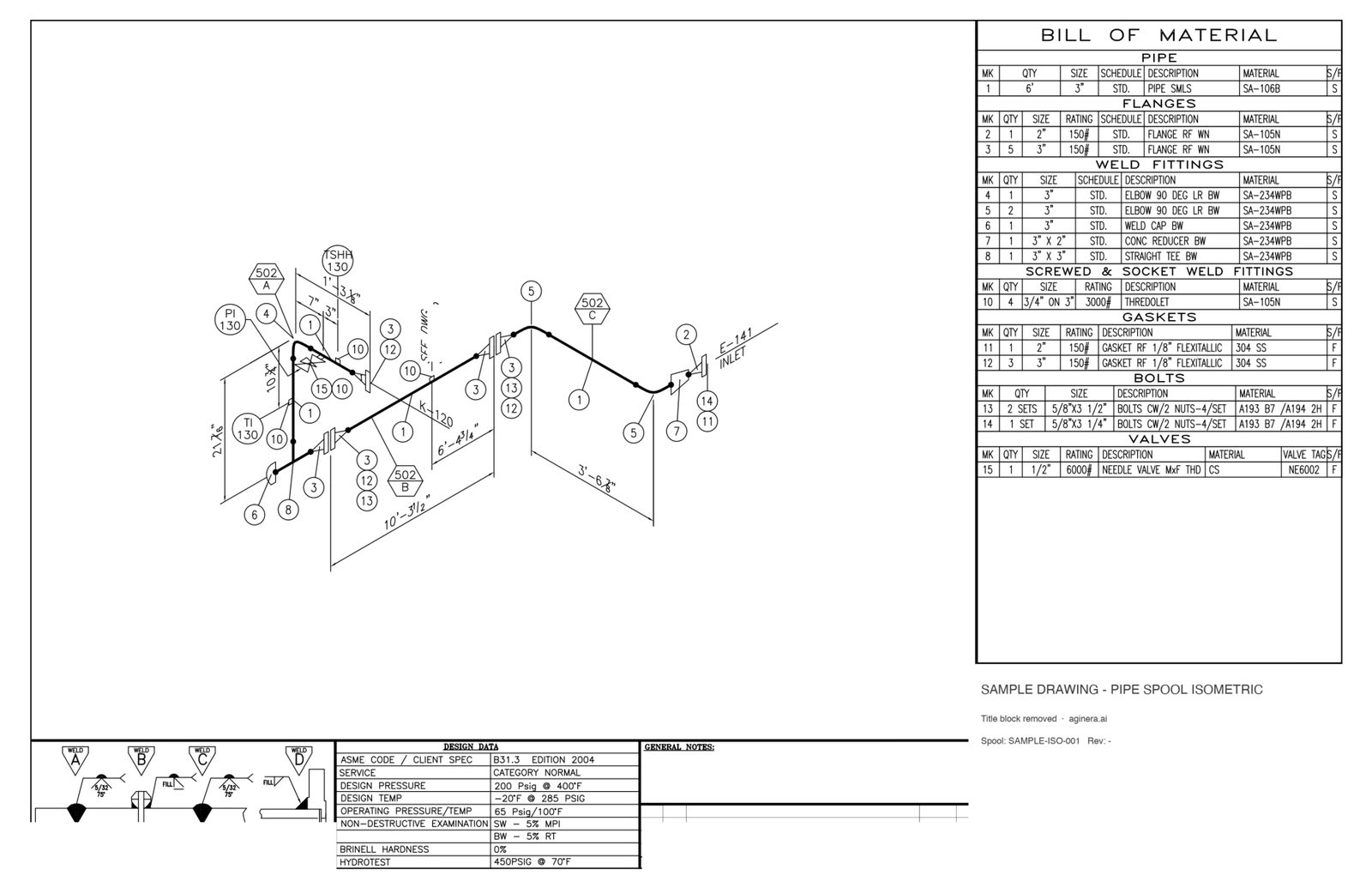
Sample sheet 1 of 1. Title block, company names and drawing numbers removed. Download the sample PDF →
Pipe spool isometric — single sheet, scanned
One spool: 3" carbon-steel gas outlet with flanges, elbows, a reducer, a tee, thredolets, gaskets, bolt sets and a needle valve. Scanned sheet with a sectioned BILL OF MATERIAL box and a design-data block.
- Pages
- 1
- Read time
- ~20s
Bill of material as read by Aginera — 14 lines
Every line below was transcribed from the printed table on the sheet; nothing was typed in.
| Pos | Section | Description | Size / rating / material | Qty | Unit |
|---|---|---|---|---|---|
| Sheet 1Spool SAMPLE-ISO-001System CATEGORY NORMAL | |||||
| 1 | PIPE | PIPE SMLS | 3" STD. SA-106B S | 6 | ft |
| 2 | FLANGES | FLANGE RF WN | 2" 150# STD. SA-105N S | 1 | |
| 3 | FLANGES | FLANGE RF WN | 3" 150# STD. SA-105N S | 5 | |
| 4 | WELD FITTINGS | ELBOW 90 DEG LR BW | 3" STD. SA-234WPB S | 1 | |
| 5 | WELD FITTINGS | ELBOW 90 DEG LR BW | 3" STD. SA-234WPB S | 2 | |
| 6 | WELD FITTINGS | WELD CAP BW | 3" STD. SA-234WPB S | 1 | |
| 7 | WELD FITTINGS | CONC REDUCER BW | 3" X 2" STD. SA-234WPB S | 1 | |
| 8 | WELD FITTINGS | STRAIGHT TEE BW | 3" X 3" STD. SA-234WPB S | 1 | |
| 10 | SCREWED & SOCKET WELD FITTINGS | THREDOLET | 3/4" ON 3" 3000# SA-105N S | 4 | |
| 11 | GASKETS | GASKET RF 1/8" FLEXITALLIC | 2" 150# 304 SS F | 1 | |
| 12 | GASKETS | GASKET RF 1/8" FLEXITALLIC | 3" 150# 304 SS F | 3 | |
| 13 | BOLTS | BOLTS CW/2 NUTS-4/SET | 5/8"X3 1/2" A193 B7 /A194 2H F | 2 | sets |
| 14 | BOLTS | BOLTS CW/2 NUTS-4/SET | 5/8"X3 1/4" A193 B7 /A194 2H F | 1 | set |
| 15 | VALVES | NEEDLE VALVE MXF THD | 1/2" 6000# CS NE6002 F | 1 | |
Spool register — read from the same sheets
Title block, fabrication notes and design data, one row per spool sheet. Exported as a Spools tab in the Excel workbook.
| Sheet | Spool | System | Pipe class | Coating | Design code | Design / test pressure | NDE | BOM lines |
|---|---|---|---|---|---|---|---|---|
| 1 | SAMPLE-ISO-001 | CATEGORY NORMAL | B31.3 EDITION 2004 | 200 Psig @ 400°F · 450PSIG @ 70°F | SW - 5% MPI BW - 5% RT | 14 |
More sample output: a six-spool fabrication package with a spool register → and a steel framing set counted into a BOM by shape →
Try it free — no signup
Explore real public bid sets and see AI-extracted BOMs mapped back to the drawings.
How BOM extraction works
AI Scans Drawings
Computer vision analyzes every sheet — plans, details, schedules, and legends — identifying components by symbol, annotation, and context.
Components Classified
Each identified item is classified by type, size, and specification. The AI reads annotations, schedules, and notes to capture the full description.
Quantities Aggregated
Component counts are aggregated across all sheets. Duplicates are flagged. Linear items (conduit, ductwork) are measured by the AI.
BOM Generated
A structured BOM is produced with type codes, descriptions, quantities, units, drawing references, and confidence scores for human review.
Frequently asked questions
What is BOM extraction?
BOM (Bill of Materials) extraction is the process of identifying every component in a drawing set and compiling them into a structured list with quantities, specifications, and references. Traditionally done manually, Aginera automates this with AI — transcribing the material tables printed on the sheets where they exist, and counting components from the drawings where they do not.
What exactly comes out?
For a printed table: position, description, size / rating / material, quantity and unit for every line, grouped by sheet — the sample on this page shows all 14 lines from one isometric. For a plan set: one row per counted item or tag with description, quantity, unit and the sheet it was found on. Both export to Excel or CSV and every row links back to its place on the drawing.
How does AI BOM extraction compare to manual methods?
Manual BOM creation typically takes 4-12 hours per drawing set and is prone to missed items and counting errors. AI extraction completes in minutes with consistent methodology, then presents results for human review and adjustment.
Can I map BOM items to my vendor catalog?
Yes. Aginera allows you to map extracted components to your preferred vendors and part numbers. Once mapped, future extractions automatically use your vendor associations for pricing.
Does it work on scanned drawings?
Yes. Vector PDFs are read from their text layer, which is exact and free; scanned or flattened sheets are read with AI vision, one call per page. The isometric on this page is a scan and was read in about 20 seconds.
How are duplicates handled across multiple sheets?
The AI tracks components across all sheets in a set and flags potential duplicates — items that appear on multiple sheets but should only be counted once (like equipment shown on both a floor plan and a detail).
Upload your drawing → get takeoff + BOM in minutes
Free 7-day trial. No credit card required.