Update, 27 September 2026: Aginera is now listed in the Claude Connectors Directory — in Claude, open Settings → Connectors, search for Aginera and click Connect; no manual URL needed. The connector also gained
list_takeoffs(read takeoffs you ran in the web app) and PDF-to-CAD tools (convert_pdf_to_cad,get_cad_file: DXF free, clean DWG $2). See aginera.ai/agents.
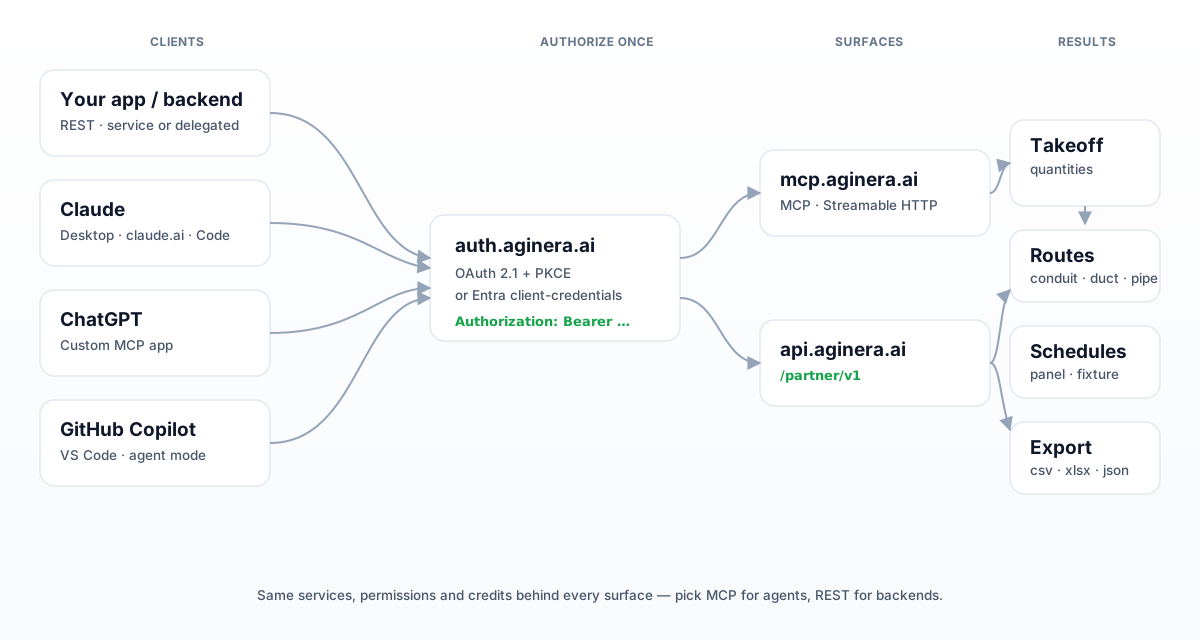
Aginera turns construction drawings into structured takeoffs — quantities, measured routes and schedules — and it exposes that engine two ways:
- REST API (
https://api.aginera.ai/partner/v1) for your own backend, CI, or batch jobs. - Remote MCP server (
https://mcp.aginera.ai/mcp) for agents — Claude, ChatGPT, GitHub Copilot, or anything that speaks MCP.
Both hit the same services with the same permissions and the same credit billing. Pick MCP when a human or an agent is in the loop; pick REST when your code is driving.
Authentication in one paragraph
Every call carries Authorization: Bearer <token>. There are two ways to get that token:
- Delegated (self-serve, recommended to start) — OAuth 2.1 authorization code + PKCE against
https://auth.aginera.ai. Register a public client, a user approves once, refresh tokens keep it alive. No client secret. - Service — OAuth 2.0 client credentials issued by Microsoft Entra ID, for fully unattended backends. Provisioned during partner onboarding.
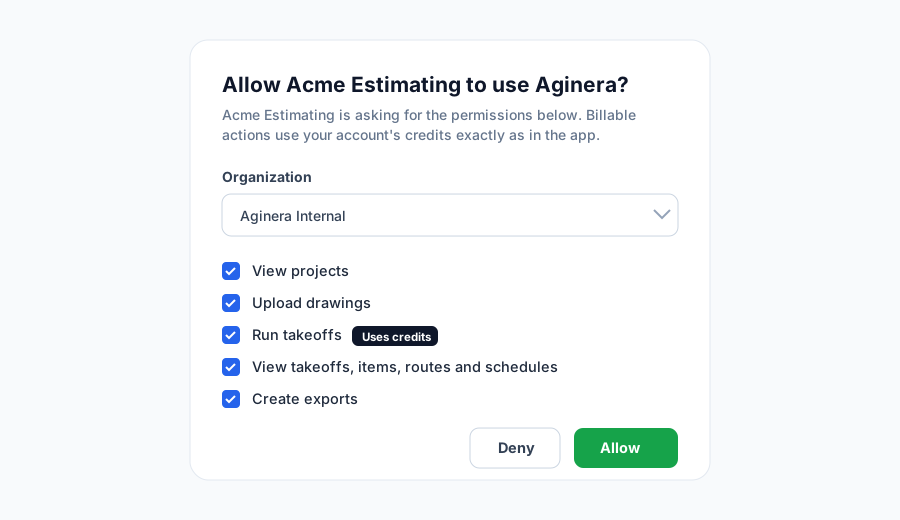
When a user approves your integration they see exactly what they're granting, and billable scopes are called out:
Part 1 — Into your own app (REST)
Here is the whole path — token, project, upload, takeoff, results — as plain curl. This is the delegated flow; swap step 1 for client-credentials if you're on service mode.
1. Register a client and get a token (once)
AS=https://auth.aginera.ai

curl -s -X POST $AS/oauth/register -H "Content-Type: application/json" -d '{
  "client_name":"Acme Estimating",
  "redirect_uris":["http://localhost:8765/callback"],
  "grant_types":["authorization_code","refresh_token"],
  "response_types":["code"],
  "token_endpoint_auth_method":"none"
}'                                        # → { "client_id": "oc_…" }

# PKCE, send the user to $AS/oauth/authorize?…&code_challenge=…&scope=…,
# capture ?code= at your redirect_uri, then:
curl -s -X POST $AS/oauth/token \
  --data-urlencode grant_type=authorization_code --data-urlencode "code=$CODE" \
  --data-urlencode "redirect_uri=http://localhost:8765/callback" \
  --data-urlencode "client_id=$CLIENT_ID" --data-urlencode "code_verifier=$VERIFIER"
# → { "access_token":"…", "refresh_token":"…", "expires_in":3600 }
The
redirect_uriis your app's callback. A hosted backend registers its public HTTPS URL (https://app.acme.com/oauth/callback); a CLI or desktop tool uses alocalhostloopback on the user's machine. Aginera only ever redirects to a URI you pre-registered.
2. Create a project, upload a drawing
API=https://api.aginera.ai/partner/v1
AUTH="Authorization: Bearer $TOKEN"

PRJ=$(curl -s -X POST $API/projects -H "$AUTH" -H "Content-Type: application/json" \
  -H "Idempotency-Key: $(uuidgen)" -d '{"name":"Riverside Offices"}' | jq -r .id)

# Request an upload slot, PUT the bytes with the returned headers, then complete
DOC=$(curl -s -X POST $API/documents -H "$AUTH" -H "Content-Type: application/json" \
  -d "{\"project_id\":\"$PRJ\",\"filename\":\"E-series.pdf\",\"source\":{\"type\":\"upload\",\"size_bytes\":$(stat -f%z E-series.pdf),\"content_type\":\"application/pdf\"}}")
DOC_ID=$(echo "$DOC" | jq -r .document.id)
curl -s -X PUT "$(echo "$DOC" | jq -r .upload.url)" \
  -H "x-ms-blob-type: BlockBlob" -H "Content-Type: application/pdf" --data-binary @E-series.pdf
curl -s -X POST $API/documents/$DOC_ID/complete -H "$AUTH"
# poll GET /documents/{id} until status == "ready"
3. Run a takeoff, read structured results
TKO=$(curl -s -X POST $API/takeoffs -H "$AUTH" -H "Content-Type: application/json" \
  -d "{\"document_id\":\"$DOC_ID\",\"discipline\":\"electrical\"}" | jq -r .id)
# poll GET /takeoffs/{id} until status == "completed"

curl -s "$API/takeoffs/$TKO/items?consolidated=true&units=imperial" -H "$AUTH"
curl -s "$API/takeoffs/$TKO/routes?system=conduit" -H "$AUTH"
curl -s "$API/takeoffs/$TKO/schedules" -H "$AUTH"
curl -s -X POST $API/exports -H "$AUTH" -H "Content-Type: application/json" \
  -d "{\"takeoff_id\":\"$TKO\",\"format\":\"xlsx\"}"
Every item carries extracted_quantity (immutable), quantity_override (yours) and effective_quantity, plus geometry and evidence in page-normalized coordinates — so you can draw the exact box the number came from.
A production client wants token refresh and polling built in:
import time, requests
AS, API = "https://auth.aginera.ai", "https://api.aginera.ai/partner/v1"

class Aginera:
    def __init__(self, token, refresh, client_id):
        self.tok, self.refresh, self.cid = token, refresh, client_id
    def _h(self): return {"Authorization": f"Bearer {self.tok}"}
    def _renew(self):
        r = requests.post(f"{AS}/oauth/token", data={
            "grant_type": "refresh_token", "refresh_token": self.refresh,
            "client_id": self.cid}).json()
        self.tok, self.refresh = r["access_token"], r.get("refresh_token", self.refresh)
    def get(self, path, **kw):
        r = requests.get(f"{API}{path}", headers=self._h(), **kw)
        if r.status_code == 401: self._renew(); r = requests.get(f"{API}{path}", headers=self._h(), **kw)
        r.raise_for_status(); return r.json()
    def wait(self, path, done=("completed", "ready"), every=30):
        while (s := self.get(path)["status"]) not in done:
            if s == "failed": raise RuntimeError(f"{path} failed")
            time.sleep(every)
        return s
Part 2 — Into Claude
Claude connects to Aginera as a custom connector over remote MCP (Streamable HTTP + OAuth). Nothing to host — Claude talks straight to mcp.aginera.ai.
Claude Desktop / claude.ai
- Settings → Connectors → Add custom connector.
- Name it
Aginera, URLhttps://mcp.aginera.ai/mcp. - Click Connect — Claude opens the Aginera sign-in, you pick your organization and Allow the scopes.
- Ask, in plain language:
"Take off the electrical scope from the latest drawing set for the Riverside Offices project and summarize conduit by panel."
Claude Code (CLI) — one line:
claude mcp add --transport http aginera https://mcp.aginera.ai/mcp
Claude discovers the tools (search_projects, run_takeoff, get_takeoff_items, …) and asks before any billable action, because the run_takeoff scope is flagged Uses credits on the consent screen above.
Part 3 — Into ChatGPT
ChatGPT adds Aginera as a custom MCP app:
- Settings → Plugins → New (the + in the plugins panel).
- Name
Aginera; Description "Turn construction drawings into takeoffs, measured routes and schedules." - Connection → Server URL →
https://mcp.aginera.ai/mcp. - Authentication → OAuth (settings are discovered automatically).
- Tick I understand and want to continue, click Create, then sign in and Allow.
The Aginera app then lists its Actions (add_document, run_takeoff, get_takeoff_items, …) with their input schemas, ready to call from a conversation.
Part 4 — Into GitHub Copilot / VS Code
VS Code speaks MCP too. Drop a server into .vscode/mcp.json:
{
  "servers": {
    "aginera": { "type": "http", "url": "https://mcp.aginera.ai/mcp" }
  }
}
Reload the window and open Copilot Chat in agent mode — it prompts the OAuth sign-in on first use, then Aginera's tools are available alongside your repo tools. Handy for wiring takeoff data straight into an estimating script you're already editing.
Billing, in one look
Aginera bills by artifact. New accounts start with trial credits, so your first takeoffs run without buying anything. Read-only calls (get_capabilities, get_takeoff_items, search_projects) are free; billable operations draw down credits against a published rate card:
curl -s $API/credits -H "$AUTH"
# → { "available": …, "rate_card": [
#      { "operation":"takeoff.page", "credits":2.5 },
#      { "operation":"takeoff.text_page", "credits":0.5 }, … ] }
POST /takeoffs returns an estimated_credits ceiling before any work starts, and the final charge never exceeds it — so you can show a cost, or gate on budget, before committing.
A few things that will save you time
- Poll, or use a webhook. Ingestion and takeoffs are asynchronous. Poll
GET /documents/{id}andGET /takeoffs/{id}, or register a webhook and skip the loop. - Idempotency-Key on writes. Retries are safe when you send one.
- Errors are typed. Every error is RFC 9457 problem+json with a stable
code, anext_step, and arequest_id— quote it to support. - Ignore unknown fields. The API is additively versioned in the path (
/partner/v1); new fields are not breaking.
Start here
- Docs: aginera.ai/docs/developer
- REST quickstart: /docs/developer/rest-quickstart
- Connect an agent: /docs/developer/connect-agent
- OpenAPI:
https://api.aginera.ai/partner/openapi/v1.json
Whether it's your own service, Claude, ChatGPT or Copilot on the other end, it's the same drawing-to-takeoff engine — you just choose the door.