Decide, Don't Generate: Inside Aginera's Decision Engine for AI in Construction and Design Automation
A lot of people building with AI have been reading about Jev lately. TypeSafe AI's model does something that sounds almost too simple: you declare the valid answers up front, and the model returns one of them with a probability. It doesn't chat. It doesn't explain itself. It decides.
That idea resonated with us because we had been arriving at the same place from the other direction — not from a general model looking for use cases, but from a construction pipeline drowning in judgment calls. This article is the account of the decision engine we built for Aginera: why AI in construction needs one, where it sits between the drawings and the price, and what it measures on customers it has never seen.
The problem: construction AI is mostly judgment, and judgment was hard-coded
Reading a drawing is only half of a takeoff. The other half is a long chain of small decisions that an experienced estimator makes without noticing:
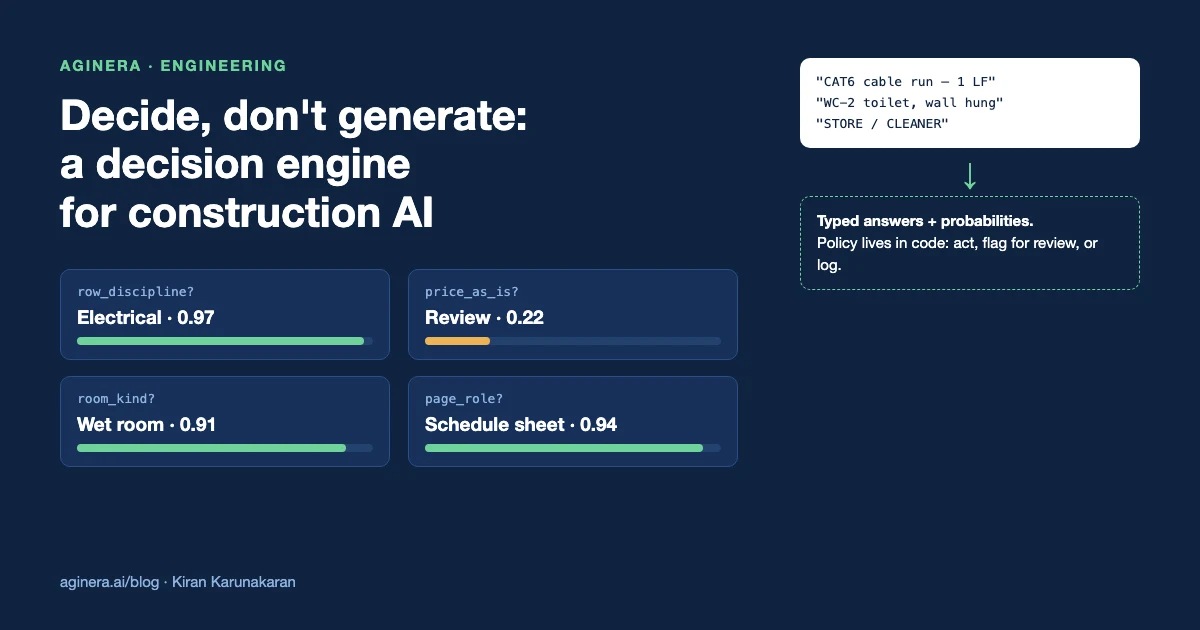
- This row says "CAT6 cable run — 1 LF." Is that a real quantity, or did the length get lost?
- This fixture tag appears on a mechanical sheet. Is it mechanical, or an electrical connection to mechanical equipment?
- This text on a floor plan reads "STORE / CLEANER." Is that one room, two rooms, or a note?
- This page is dense with tables. Is it a schedule sheet, a specification, or a plan with a legend?
For a long time, every one of those judgments became an if statement. One rule per trade, per symptom, per customer complaint. It worked — until it didn't. Rules are brittle across firms and regions, they interact in ways nobody can predict, and every new drawing convention means another branch. We wrote about the strategic side of this in Aginera Digitizes Judgment. This is the engineering side.
The obvious modern answer is to ask an LLM. We tried that too.
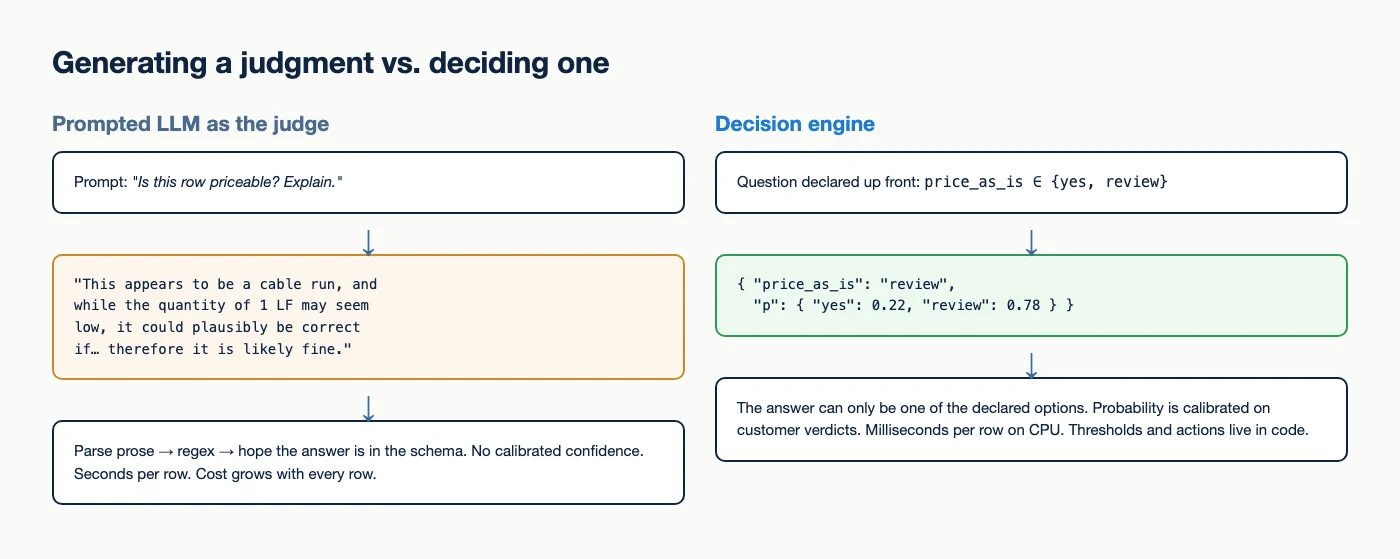
A prompted language model will happily give you an opinion about a row. It will give you a paragraph of reasoning, an answer that may or may not be in your schema, and no confidence you can actually threshold on. It takes seconds per row and costs money per token. Run it on a 2,000-row takeoff and you have a slow, expensive, unauditable second opinion.
What we needed was the opposite: bounded questions, typed answers, calibrated probabilities, milliseconds per row. In other words, a decision model.
Decide, don't generate
The core design principle is a clean separation of jobs:
- Generation finds candidates. Vision and language models are still the best tool for reading a drawing and proposing what's on it — marks, descriptions, quantities, rooms, routes. That's the extraction pipeline and it stays.
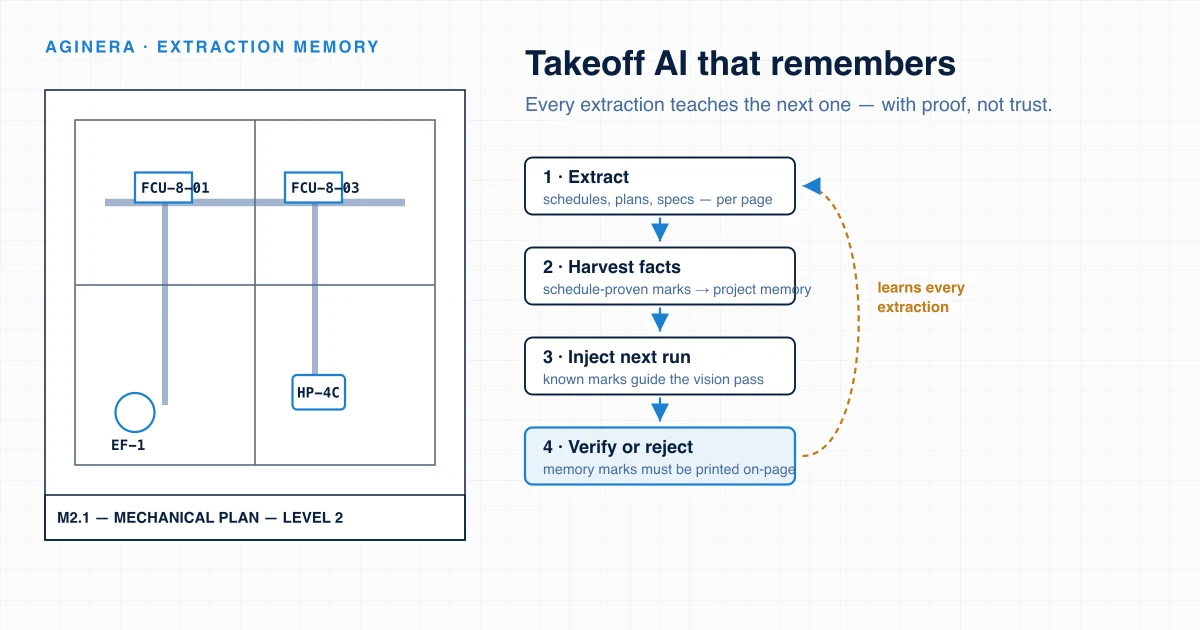
- Rules keep the hard guarantees. Some things are not judgments. A mark that is not printed on the page is never priced from memory; we enforce that as an invariant, not a probability (see Takeoff AI That Remembers).
- The decision engine judges everything in between. It answers declared questions about each candidate, with a probability per answer.
- Code applies the policy. Thresholds and actions live in ordinary, reviewable code — not inside a prompt.
That last point matters more than it looks. When the policy is in code, you can change a threshold without retraining, audit why a row was flagged, and roll back a decision with a config change. When the policy is inside a prompt, you can do none of those things reliably.
Where the decision engine sits
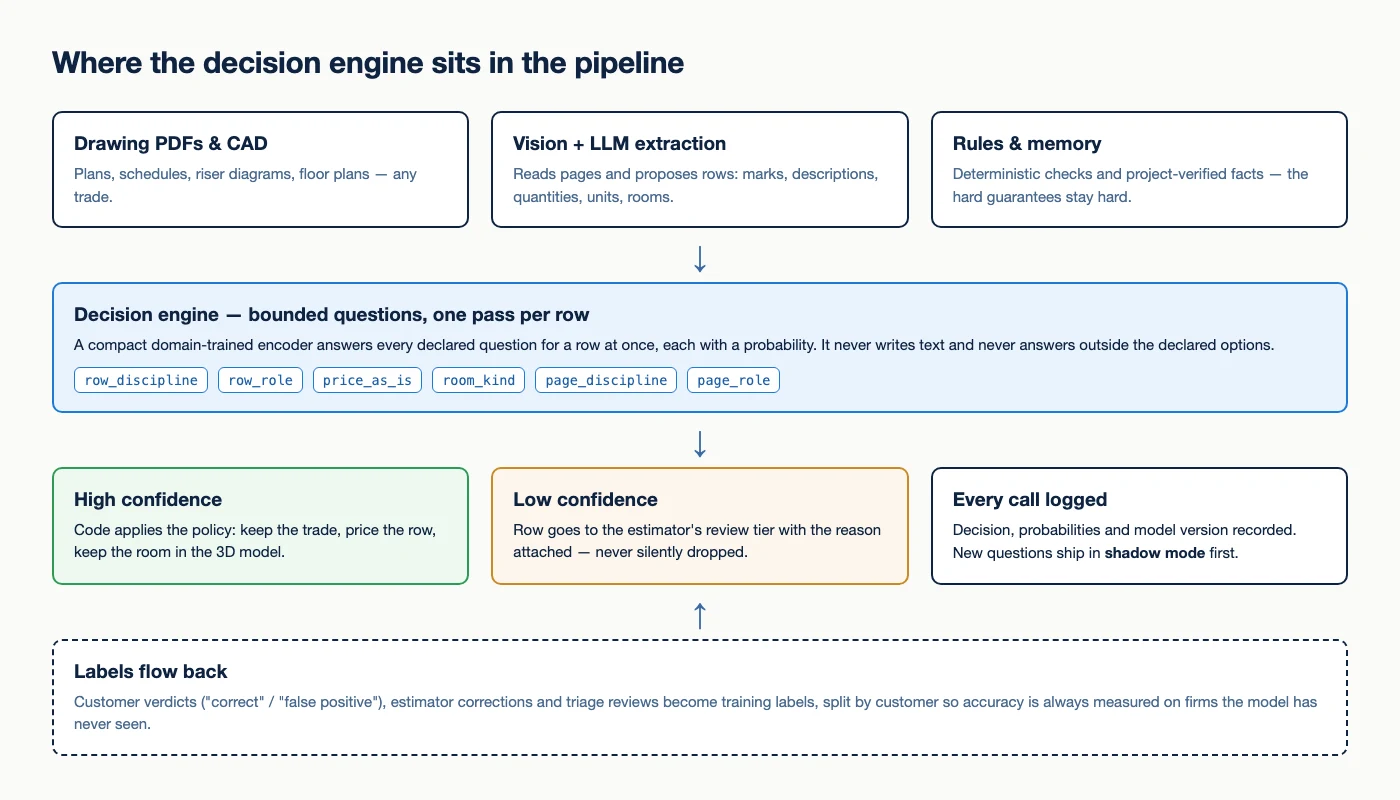
Today the engine answers six questions, all from one pass over each row:
| Question | What it decides | Who uses it |
|---|---|---|
row_discipline | Which trade a row belongs to | Takeoff, estimate grouping |
row_role | Whether a row is a countable item, a reference, a note or a header | Takeoff cleanup |
price_as_is | Whether a row is safe to price exactly as extracted | Estimating |
room_kind | Whether a floor-plan label is a room, a wet room, an exterior zone or an annotation | 3D and interior design |
page_discipline | Which trade a sheet primarily belongs to | Page routing |
page_role | Whether a sheet is a plan, a schedule, a detail or a specification | Page routing |
Adding a judgment no longer means adding a branch. It means declaring a question and collecting labels for it. That's the shift that matters: estimator knowledge becomes training data instead of code.
Where the labels come from
A decision model is only as good as the decisions it learns from, and here construction has an advantage that general-purpose models don't: the people using the product are domain experts, and they tell us when we're wrong.
- Customer verdicts. When an estimator marks a takeoff row as correct or as a false positive, that's a high-precision label. We have thousands of them across more than eighty firms.
- Estimator corrections. Rows re-assigned to another trade, quantities fixed, rooms renamed.
- Reviewed drawing sets. Our own daily triage of production extractions, where every disagreement is checked against the drawing like an estimator would.
The most important rule in our evaluation: we split by customer, not by row. A model can look brilliant if it is tested on rows from firms it has already seen — it simply learns each firm's habits. Every number in this article is measured on firms the model never trained on, because that's the only number that predicts how it behaves on your drawings.
Fast enough to run on every row
The engine is a compact, domain-trained encoder with one small head per question. A single forward pass answers every question for a row at once. In serving it runs on ordinary CPUs, scales to zero when idle, and costs nothing per token.
Speed wasn't a nice-to-have; it was the gate. Our first version was a heavier model that simply could not keep up in production, so we retired it. A judgment layer that can only afford to look at a sample of rows isn't a judgment layer — it's a spot check. The version in production answers in roughly 9 milliseconds per row and handles a 64-row page batch in under half a second.
Measured on customers it has never seen
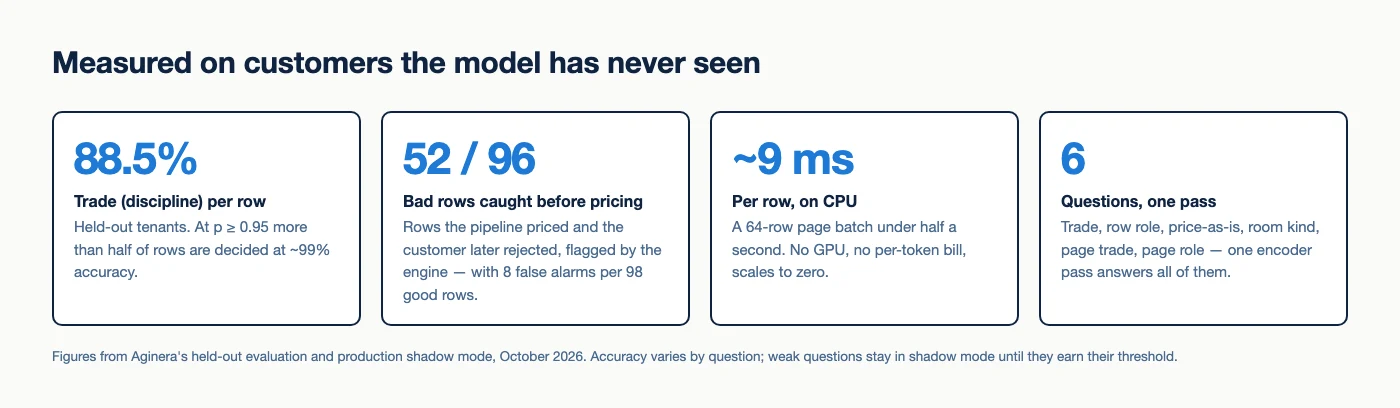
- Trade per row: 88.5% on held-out firms. More useful than the average: at a confidence of 0.95 or higher, more than half of all rows are decided at roughly 99% accuracy. That's the slice you can safely automate; the rest goes to review.
- Bad rows caught before pricing: 52 of 96. These are rows the pipeline priced and a customer later rejected — the most expensive kind of error in estimating. The engine flagged over half of them, at a cost of 8 false alarms per 98 good rows.
- Room kind: about 73%. Good enough to flag, not yet good enough to act alone — so it flags.
- Page-level questions are the weakest today. Page trade in particular is a hard problem when a sheet title disagrees with its contents. Those questions stay in shadow mode until they earn it.
We report the weak numbers on purpose. A decision engine that doesn't know where it's weak is just a confident guesser — and in construction, confident guessing is exactly how a wrong number ends up in a bid.
Shadow mode first, always
Every question ships in shadow mode before it is allowed to act. In shadow mode the engine judges real production extractions and logs its decision, its probabilities and the model version next to what the existing rules did — without changing a single customer result.
That log is the real product of the first weeks. On price decisions, the engine agreed with the existing rules about nine times in ten; the disagreements are where the learning is. Some are the engine catching an error the rules missed. Some are the engine being wrong. Reviewing them is how labels get made and thresholds get set. A question graduates from shadow to acting only when its accuracy on unseen customers clears the bar for that question — and that switch is a human decision, not an automatic one.
AI for design automation runs on the same judgments
It's easy to think of estimating and design as different problems. Underneath, they need the same thing: reliable judgments about messy drawing content.
When Aginera turns a 2D floor plan into a 3D model or an interior design, every text label on the plan needs a verdict. "KITCHEN" is easy. "STORE / CLEANER", "WC-2", "DRAWING", "TERRACE" and "BY OTHERS" are not. Get them wrong and a 3D model sprouts a room that's really a note, or loses a bathroom because its label looked like a fixture tag.
The room_kind question answers that with a probability, which gives the design pipeline the same three-way choice as the takeoff: keep the space, drop the annotation, or flag it for a human. Design automation that can say "I'm not sure about this one" is far more useful than design automation that silently guesses. We've written more about keeping 3D grounded in the drawing in Floor Plan to 3D: Data-Grounded AI Rendering.
General decision models vs. a domain decision engine
Should you use a general decision model like Jev, or build your own? Our honest view:
- General decision models are a great default when the judgment is general — routing support tickets, scoring leads, deciding the next tool call for an agent. You get typed outputs and probabilities without collecting your own labels.
- A domain engine wins when the judgment depends on knowledge only your users have. No general model knows that a 1 LF cable run is almost always a lost length, that a particular engineer labels exhaust fans with a bare keynote, or that "DRAWING" on an Indian residential plan is a room, not a title. Those facts live in thousands of estimator verdicts, and they're what the model learns.
The principle is the same either way, and it's the one we'd urge anyone building AI in construction to adopt: let generative models read, let decision models judge, let code decide what happens, and measure every judgment on customers the model has never seen.
What this means if you use Aginera
Nothing about the workflow changes: upload drawings, review the takeoff, export to your estimate or open the 3D model. What changes is the review tier. Rows the engine is confident about stop needing your attention; rows it doubts arrive with a reason; and every correction you make becomes a label that improves the next decision — for your firm and for everyone else's.
Try it on your own drawings with the free tools — electrical takeoff, HVAC takeoff, plumbing takeoff or floor plan to 3D.