Ask an estimator which half of an MEP takeoff takes longer and the answer is rarely the counting. Diffusers, fixtures and valves are symbols, and software has counted symbols well for a while. Length is the slow half: tracing every duct and pipe run, at the right scale, split by size, without measuring the same run twice because it also appears in a section.
This post shows how Aginera measures duct and pipe linear footage from drawings, using two real sheets run through the product. Project and client details are withheld, and so are the drawings themselves. The numbers are exactly what the product's route report shows, and we checked each sheet against the drawing before publishing. What that check found is below too.
The short answer
AI takeoff software measures duct and pipe by tracing each run on the plan, converting its drawn length to feet using the sheet's scale, reading the size printed beside the run, and splitting the total into one line per size and system. Fittings are counted where runs meet or change size, and insulation area follows from the size and wrap thickness. Run length that has no readable size should stay on its own review line instead of being guessed, and that line is the first thing to check.
What happens between the PDF and the number
Aginera's route engine (internally called RouteNet) does five things on each plan sheet:
- Traces the runs. Duct is drawn as two parallel walls and pipe as a single line, often with a system pattern. The engine reduces each run to a centreline and joins runs into a network.
- Fixes the scale. It uses the printed scale or scale bar. If neither is in the text, it can infer the scale from the size labels: an 18×12" duct whose walls are a known distance apart on the page tells you the scale. That inference is only accepted when the labels clearly agree on one standard scale. Sheets it can't scale are not measured.
- Reads printed sizes. Size labels such as
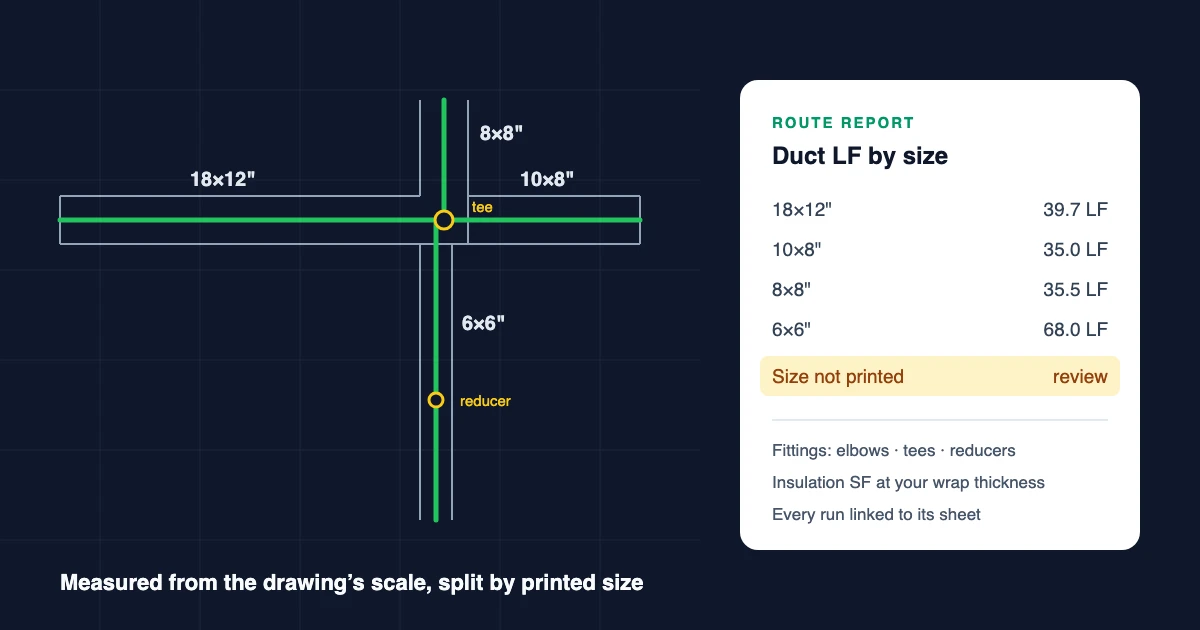
18x12,Ø300or2" TO FD-1are attached to the run they label, including labels on a leader line. Where two labels on one run differ, that point becomes a reducer. - Filters views. Runs inside a view titled section, elevation, detail, isometric, schematic or riser are kept out of the plan length. Riser diagrams and isometrics are not drawn to scale, and sections repeat runs already on the plan.
- Builds the report. Length per size and system, fittings at junctions, insulation area, and a link from every run back to the sheet.
Example 1: a mechanical plan, 851 LF of duct across nine sizes
One mechanical plan sheet with two floor levels, both at 1/8" = 1'-0". The route report shows 850.8 LF of duct. Here it is by printed size, with insulation worked out at 1½" wrap:
| Printed size | System | Length (LF) | Insulation at 1½" (SF) |
|---|---|---|---|
| 18×16" | Duct | 17.1 | 114 |
| 18×14" | Duct | 17.3 | 110 |
| 18×12" | Duct | 39.7 | 238 |
| 16×12" | Duct | 26.0 | 147 |
| 10×10" | Duct | 19.1 | 83 |
| 10×8" | Duct | 35.0 | 140 |
| 8×8" | Duct | 35.5 | 130 |
| 8×6" | Duct | 14.8 | 49 |
| 6×6" | Duct | 68.0 | 204 |
| Size not printed | Review | 578.3 | — |
Fittings found where runs meet: 9 × 90° elbows, 2 × 45° elbows, 6 tees, 4 crosses and 1 reducer.
Two things stand out:
- 272.5 LF is sized and 578.3 LF is not. That is normal. Many duct runs on a plan carry no size label of their own, or carry one the engine can't yet read (more on that below). The unsized length is shown, not hidden or spread across the sized rows. Reviewing it is the estimator's main job, and on this sheet it held something that should come out (see below).
- Insulation is arithmetic, not a guess. For rectangular duct the insulated perimeter is 2 × (W + H + 4t). For the 18×12" row: 2 × (18 + 12 + 6) = 72 inches, so 6 ft of surface per foot, times 39.7 LF = 238 SF. The route report recalculates when you change t. All sized rows add up to about 1,215 SF.
Example 2: a plumbing underground plan, 619 LF by size and system
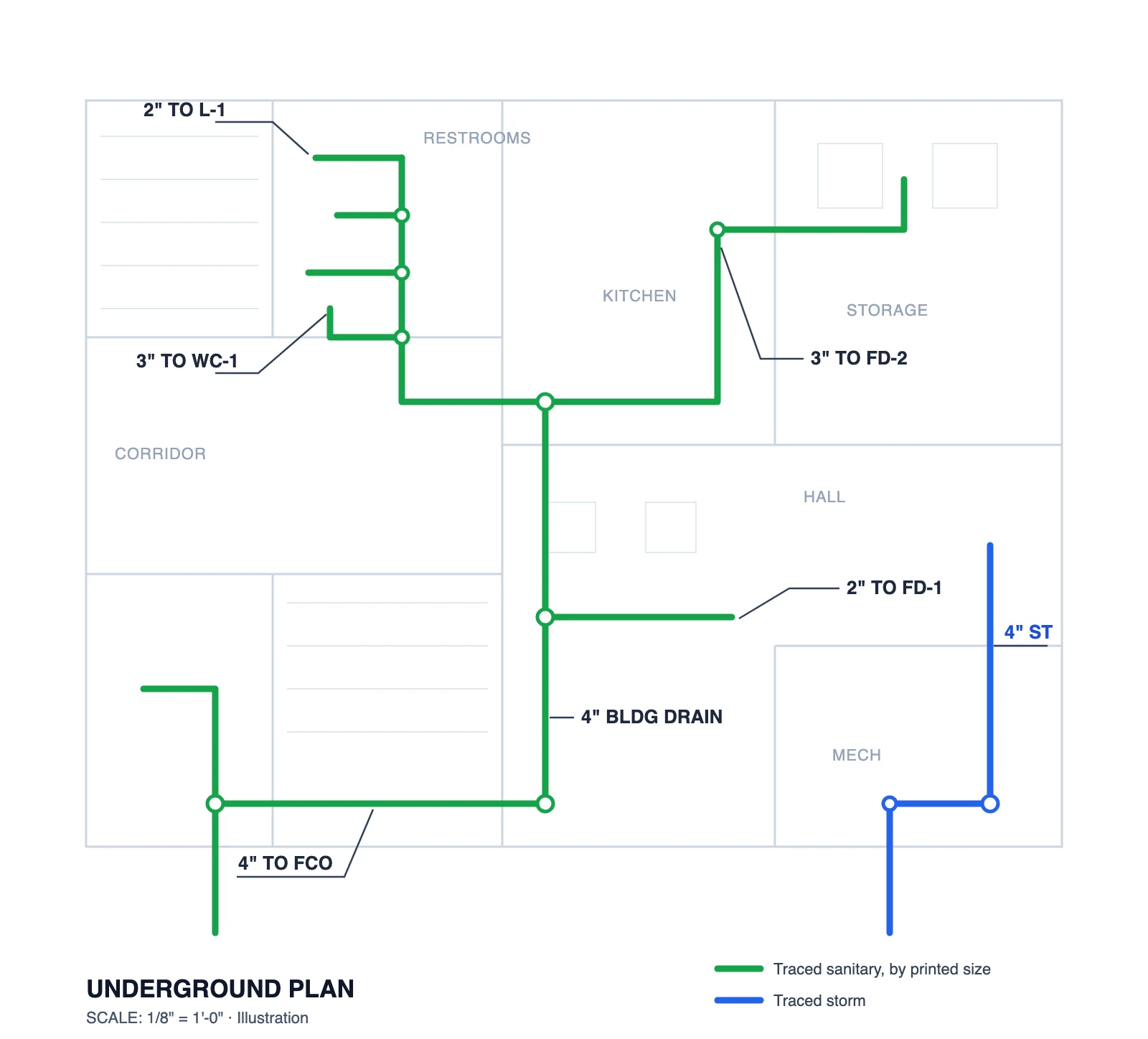
One plumbing underground plan at 1/8" = 1'-0". The route report shows 619.1 LF of pipe, split the way a plumbing estimator prices it:
| Printed size | System | Length (LF) |
|---|---|---|
| 4" | Pipe (system not labelled) | 162.7 |
| 4" | Storm | 33.2 |
| 3" | Pipe (system not labelled) | 48.2 |
| 2" | Pipe (system not labelled) | 32.5 |
| 1½" | Pipe (system not labelled) | 19.3 |
| Size not printed | Review | 323.2 |
Fittings: 12 × 90° elbows, 3 × 45° elbows, 10 tees, 4 crosses and 1 reducer.
Most sizes on this sheet come from leader callouts like 3" TO WC-1H and 4" TO FCO, which point at a pipe from a distance. The storm line is named because its label said so; the other sizes carried no system word, so they stay unnamed rather than being assumed to be sanitary or vent.
What we found when we checked
Before publishing these numbers we laid the traced runs over both drawings and checked the scale, where each size label landed, and what got traced.
- Scale: both sheets print 1/8" = 1'-0", and the plumbing sheet's scale bar agrees with the measured lengths to within 2%.
- Plumbing sheet: the traced runs follow the underground piping, and each size sits on the pipe its callout points to. We found nothing to correct.
- Duct sheet, labels: 11 of the 13 size labels sit on the duct they name. One 8×6" label sits at a junction where a 14×12" label is close by, which is ambiguous. One run carries both an 18×14" and a 12×12" label, and the whole run was counted as 18×14", so a short stretch of 12×12" is in the wrong row.
- Duct sheet, stray linework: the thermostat control wiring on this sheet is drawn as heavy curves from each thermostat, and about 85 LF of it was traced as duct. None of it carried a size, so it all sits in the "size not printed" line, which is where an estimator would strike it.
This is why the unsized line exists and why it is the first thing to review: the sized rows were right, and the problems were in the length nobody could put a size on.
Flattened PDFs: the hard case
Many mechanical sets arrive as flattened PDFs: no layers, no line types, just ink. There, telling a duct wall from a wall, a grille box or a dimension line is hard. The route engine handles this case in a deliberately narrow way. It starts from a printed duct size, looks for two walls in the same pen at exactly that width at the sheet scale, and follows them. It rejects text inside a box (schedule cells and grille tags), grids of evenly spaced lines, and pairs that don't match.
On 100 flattened duct sheets it traced 34. In a hand check of 36 random runs, 31 were correct. Every run from this path is marked for review, and sheets with no printed scale and no readable labels are left alone rather than guessed. That is a smaller result than a demo would show, and it is what the product does today.
What it doesn't do yet
- Sizes drawn as shapes. Some CAD exports turn text into outlined vector shapes. Those sizes are not read yet, so the runs go on the "size not printed" line.
- Hangers and supports. They are almost never drawn on plans, so there is nothing to count. Use the measured length with your spacing standard.
- Material. It usually lives in the specification, not on the plan, so it is assigned per size line.
- Vertical drops. A plan shows horizontal runs. Risers and drops between floors come from sections and riser diagrams, which are not measured for length.
Checking a measured takeoff before you price it
- Read the "size not printed" line first. If it is a large share of the total, look at the sheet: the sizes may be in a schedule or drawn as shapes, and curved control wiring or other linework may have been picked up.
- Spot-check one run per size against the drawing with the plan open beside the report. Every run links to its sheet.
- Look for views on the sheet (enlarged plans, sections) and confirm they were treated as separate views.
- Check the scale on any sheet that prints "AS NOTED" or has several scales.
- Set the insulation thickness per system before using the area figures.
Try it on your drawings
Run a takeoff on a mechanical or plumbing PDF in Aginera, then open the Route report on a plan sheet to see length by size, fittings and insulation for that sheet. More on each trade: AI HVAC duct takeoff, AI plumbing takeoff and MEP takeoff software.