Takeoff Software for Distributors
Upload a contractor's drawing set and send back a priced material quote. Aginera counts every fixture and piece of equipment by type, prices it from your price list, and emails the quote — without leaving the takeoff.
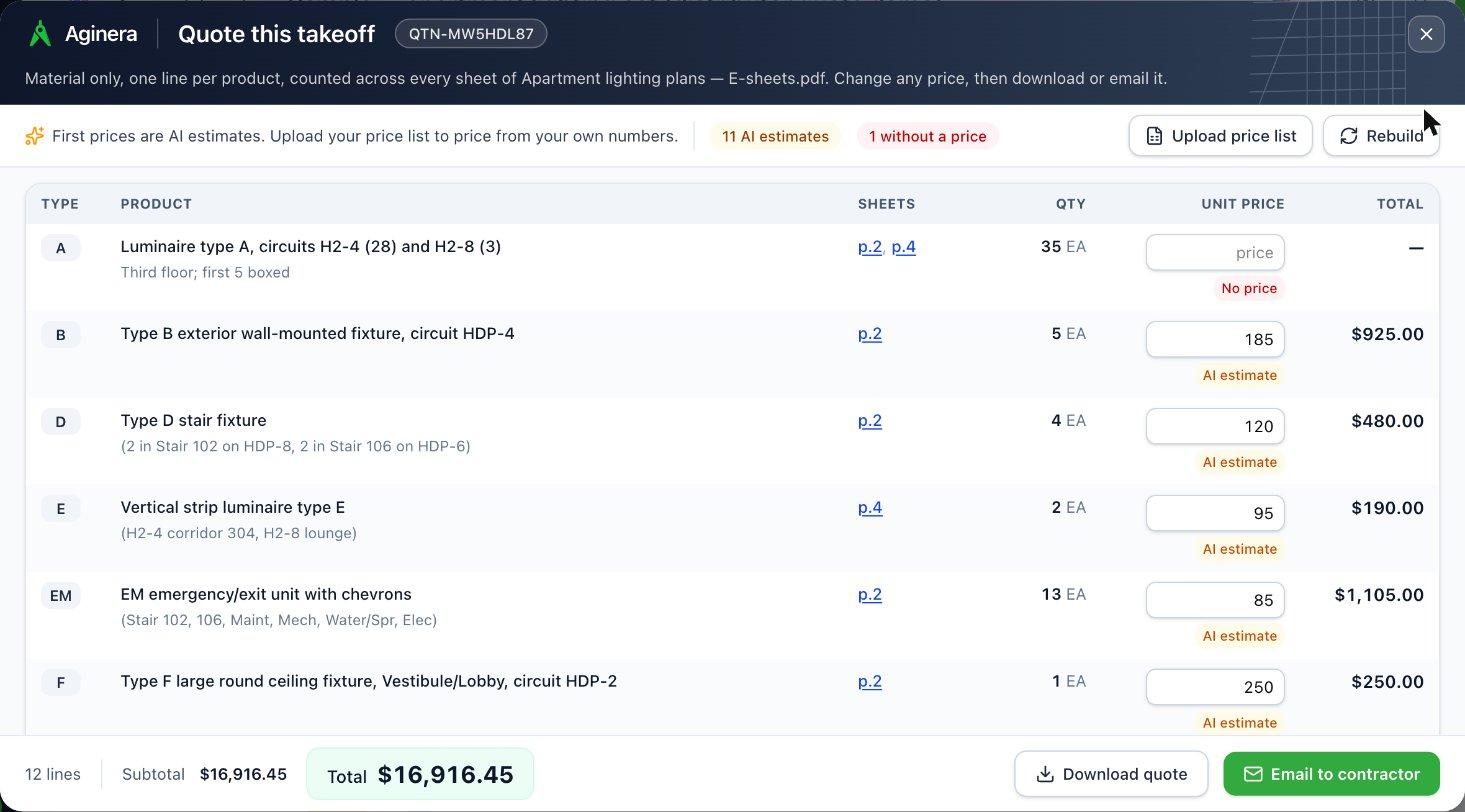
Takeoff software for distributors turns a contractor's drawing set into a priced material quote: it counts every fixture, device and piece of equipment by type across the sheets, prices each product from the distributor's own price list, and sends the quote back to the contractor. Inside sales stops counting symbols by hand and starts reviewing a quote that cites the sheet behind every line.
Built for distributors, not contractors
Contractor takeoff tools end in an installed estimate. A supply house needs something else: the products on the drawings, counted by type, priced from its own list, back to the contractor before the bid date.
| Distributor quote | Contractor estimate | |
|---|---|---|
| Who sends it | Distributor → contractor | Contractor → owner / GC |
| What is priced | Material only, per product | Installed cost: material + labour + markup |
| Price source | Your price list and discount rules | Rate cards, labour units, assemblies |
| Lines | Fixture types and products ("Type A × 35") | Assemblies and labour hours |
| In Aginera | Quote on the takeoff screen | Estimate |
From drawing set to priced quote
Four steps, one screen. The quote opens on top of the takeoff, so the sheet behind every line is a click away.
Upload the contractor's drawing set
Drop in the PDF (or DWG/DXF) the contractor sent with the RFQ. Aginera reads every sheet — lighting and power plans, fixture and equipment schedules, legends — and counts every fixture, device and piece of equipment.

Open Quote — one line per product
Quote turns the takeoff into a material quote: one line per fixture type or product, quantities added up across every sheet, and the sheets each line came from. On a multi-trade set you pick the trade you supply.
Upload your Excel price list and every line re-prices from it, with your discount rules applied. Lines your list does not cover start with an AI price estimate, clearly marked, so the first quote is never blank — type over any price.
Email it to the contractor
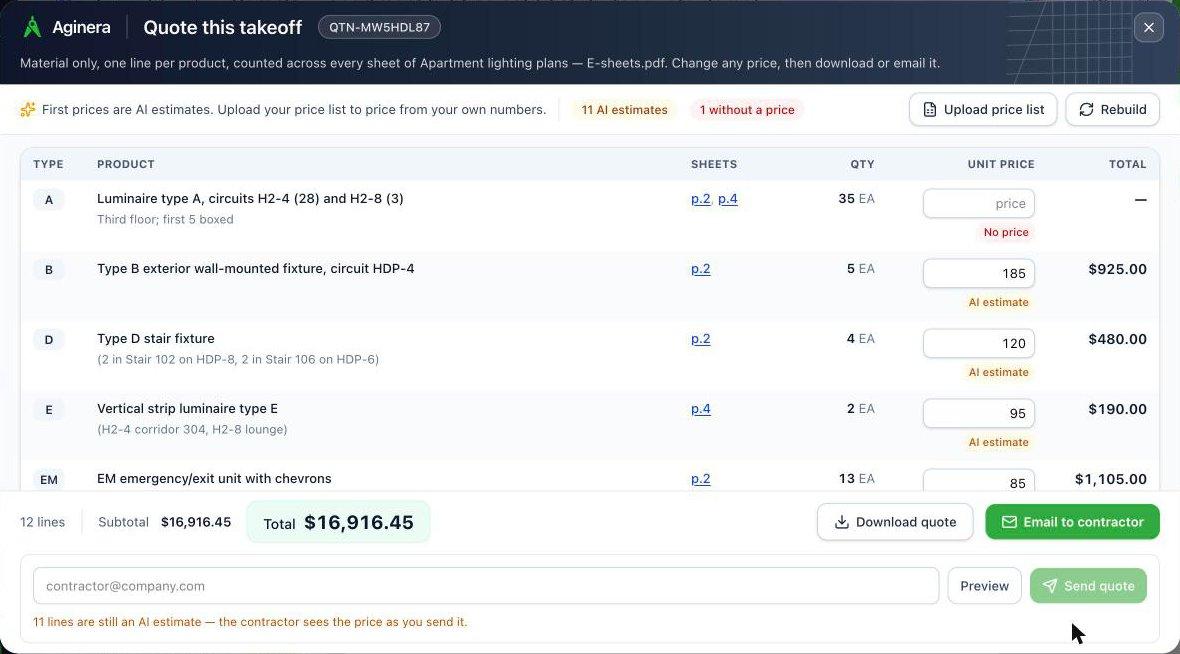
Preview the quote email and send it, or download the quote as a spreadsheet. The quote number, totals and every line go out exactly as you priced them.
Free to start — no card needed.
Built around what distributors actually quote
Lighting
Fixture types from the schedule, emergency and exit, controls and sensors — counted per type mark across every floor.
Electrical
Devices, panels and distribution gear, disconnects, low-voltage outlets.
HVAC
Condensing units, fan coils, fans, ERVs, grilles, registers, diffusers and dampers.
Plumbing
Fixtures, water heaters, pumps and equipment from plans and schedules.
Why inside sales teams quote with Aginera
Every line cites its sheet
Click a sheet on any quote line and the drawing opens on that page. A contractor who questions a count gets an answer in seconds, not a recount.
Your prices, not ours
Upload your price list once; quotes price from it with your discount rules. AI estimates fill only the gaps, and each is labelled so nothing goes out unnoticed.
All the trades you supply
Lighting, electrical, HVAC and plumbing on one platform. On a multi-trade set, quote only your trade.
One screen, no re-keying
Count, price, download and email from the takeoff itself — no copying quantities into a separate quoting tool.
Frequently Asked Questions
What is takeoff software for distributors?
Takeoff software for distributors reads a contractor's construction drawings and lists the products on them — fixtures, devices, equipment — with quantities, so a supply house or manufacturer's rep can price and quote the material. Unlike contractor takeoff tools, it stops at material: no labour, no installation, no markup for the owner.
Is a distributor quote the same as a contractor estimate?
No. Both start from the same counted takeoff, but a contractor estimate prices the installed job — material plus labour, assemblies and markup — for the building owner. A distributor quote prices the material only, per product, from the distributor's own price list, and goes to the contractor. Aginera builds the distributor quote directly from the takeoff screen.
Can it price from my own price list?
Yes. Upload your price list as an Excel file (description, part number and price columns) and every quote line is matched against it — by part number first, then by product description, with an AI check that keeps only the same product (size, rating, type). Your discount rules apply to the matched lines.
Where do the first prices come from before I upload a price list?
Lines your price list does not cover get an AI estimate of a typical distributor sell price for that product, labelled "AI estimate" on the line. They are a starting point so the first quote is complete — replace them by typing a price or uploading your list. A bare label with nothing to price ("Luminaire Type B") is left blank rather than guessed.
Which trades does it cover?
Electrical and lighting (fixture types, emergency and exit, devices, controls), mechanical / HVAC (units, fans, grilles, diffusers, dampers) and plumbing (fixtures and equipment). On a multi-trade drawing set you choose the trade you supply, and the quote lists only those lines.
How does it handle the fixture schedule?
When the set includes a fixture or equipment schedule, the quote line uses the schedule's product description for each type mark — make, model, lamp, wattage — which is what you price from. The count comes from the plans; the product comes from the schedule.
Does it connect to my ERP?
Not directly today. Download the quote as a spreadsheet to load into your ERP or quoting system, or email it to the contractor from Aginera. Tell us which system you use — that decides which integration we build first.
How is it priced?
You can start free: the free plan includes an AI takeoff of up to 5 sheets in one project, and a distributor account puts the fixture schedule or legend first among those sheets so the products are named. Larger sets run on credits — see the pricing page.
Quote your next drawing set in minutes
Upload the contractor's PDF, open Quote, send it back.
Start free as a distributorUpload your drawing → get takeoff + BOM in minutes
Free 7-day trial. No credit card required.